


Let's fill in the pencil marks for R5C5. To begin with, it could be any digit from 1 to 9.
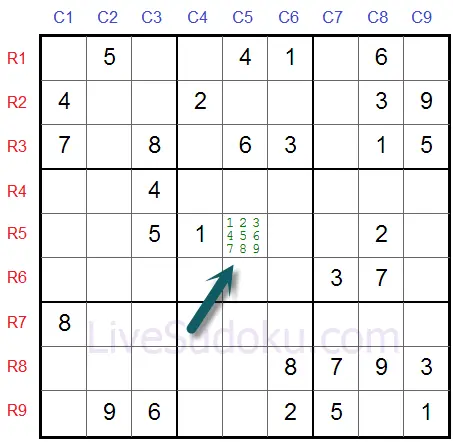
The buddy cells of R5C5 already contain the digits 1, 2, 4, 5, and 6.

R5C5 cannot contain any of those digits, so remove them from its pencil marks.

Let's look at another cell, R2C5, marked here.

Its buddy cells contain 1, 2, 3, 4, 6, and 9, leaving 5, 7, and 8 as candidates.

Here are the pencil marks for both cells.

Take a look at R2C7 in the puzzle we just marked.

It is a naked single and must contain the digit 8.

Once R2C7 is 8, remove 8 from the pencil marks of R2C5. This constant cleanup is what keeps candidate-based techniques reliable.

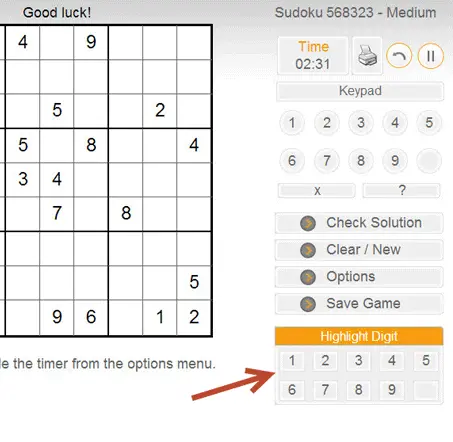
Click the Options menu while playing any puzzle.

Click On next to the Allow Pencil Marks option. From then on, placing several digits in one cell shows them as pencil marks.

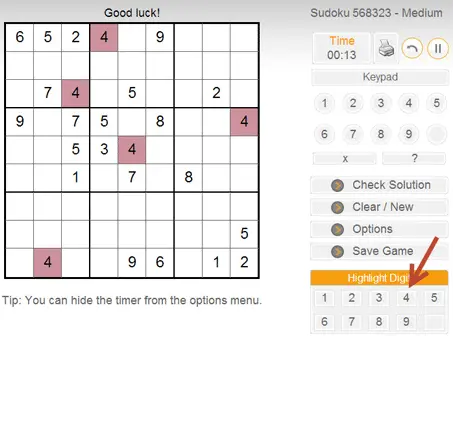
See what happens when we highlight 4: every 4 on the grid lights up, which makes scanning rows, columns, and boxes much faster.
Highlighting exposes patterns instantly. Scanning the 4s here shows that box 4 has only one legal cell for 4.
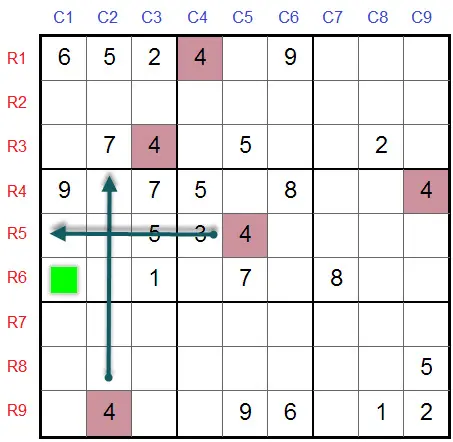
R6C2 must be a 4: a hidden single found with one highlight and no pencil marks at all.
Lesson complete
Nice work - you went through every step. Ready for the next lesson?
Next: Sudoku Strategy: Tips and TechniquesWhat pencil marks are
Pencil marks, also called candidates, are small notes written inside an empty cell that record which digits could still legally go there. On paper you write them with a pencil; on LiveSudoku, candidate mode places them for you as small digits in the cell.
Singles and easy moves can be found without notes, but from medium difficulty upward, pencil marks are the tool that makes elimination techniques possible.
Building the candidates for a cell
A cell's candidates are all digits from 1 to 9 that do not yet appear among its buddy cells: the cells sharing its row, column, or box.
Keep your pencil marks updated
Pencil marks are only useful while they are true. Every time you place a digit, remove it from the candidates of all its buddy cells.
Candidate mode in LiveSudoku
You do not need paper. LiveSudoku has a built-in pencil mark mode that you switch on once.
Walk through this in steps 10-11 of the guided example above
Highlights: the other solving aid
Highlighting complements pencil marks. On any LiveSudoku puzzle you can click a digit in the highlight menu, or press ALT plus the digit, to light up all its appearances on the grid.
Walk through this in steps 12-14 of the guided example above
Frequently asked questions
Should I fill pencil marks for the whole grid?
Usually not. Mark the houses you are actively working on. Full-grid marks are worth it only in very hard puzzles where fish patterns and wings come into play.
What is candidate mode?
Candidate mode is LiveSudoku's digital version of pencil marks: enable Allow Pencil Marks in the Options menu, and multiple digits entered in a cell appear as small notes.
Which techniques need pencil marks?
Naked singles can be found without them, but locked candidates, pairs, triples, X-Wing, Swordfish, and XY-Wing all rely on accurate candidate lists.
Practice next
Turn on candidate mode and play a medium puzzle, keeping every pencil mark updated as you place digits. Accurate notes are the foundation of every advanced technique.